Disclosure: As an Amazon Associate I earn from qualifying purchases.
Links below use your Amazon Associate tag. Check current product details, price, availability, and suitability on Amazon before buying.
Related products and resources
A smart bird feeder combines a conventional seed feeder with technology such as a camera, mobile app, motion detection or automated bird identification. It can help you observe visiting birds without sitting beside a window all day, but the best choice depends on more than image resolution. Placement, weather resistance, cleaning, connectivity and ongoing fees can have a greater effect on your experience.
What Is a Smart Bird Feeder?
A smart feeder is usually a bird feeder with an integrated camera and connected software. When a bird lands, the device may capture a photograph or video and send an alert to an app. Some systems also organize sightings or suggest bird species through image recognition.
Features vary widely. Some feeders are designed for basic snapshots, while others offer live viewing, night recording, cloud storage or local memory. A camera does not automatically make a feeder useful: a poorly positioned lens, weak Wi-Fi signal or difficult cleaning routine can undermine the benefits.
Smart Bird Feeder Features That Matter
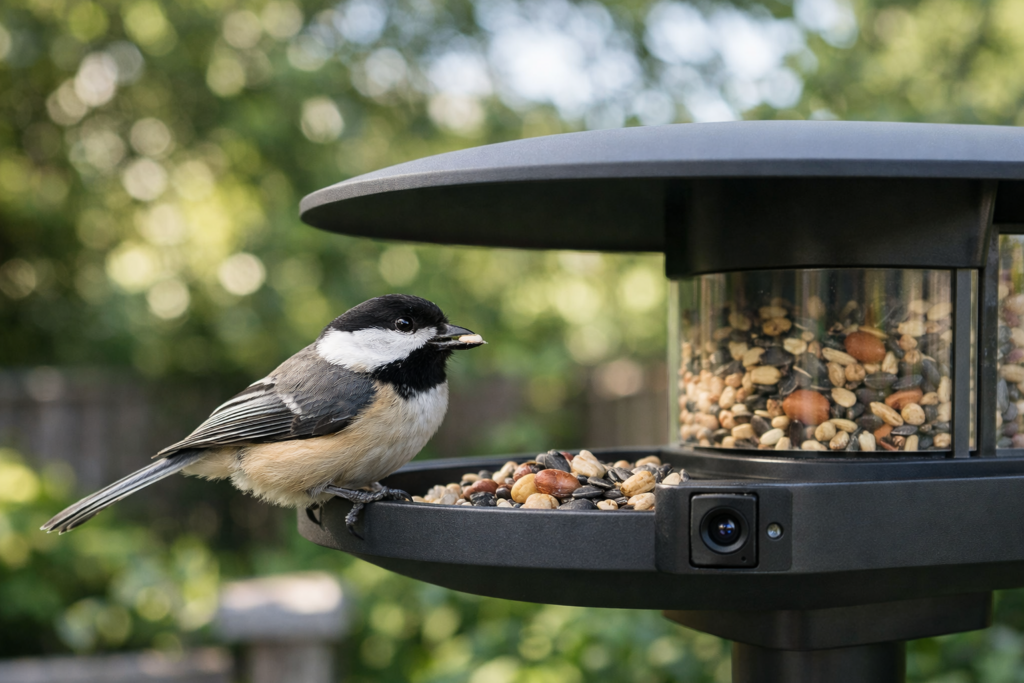
Camera quality and detection
Look for a camera positioned close enough to show the bird clearly while still covering the feeding area. A wide field of view can capture more activity, but excessive distance may make identification harder. Motion detection should be adjustable so the device does not send an alert for every branch movement or passing shadow.
Weather protection is also important. The camera housing should be suitable for outdoor exposure, and the feeder should keep seed reasonably dry. Check whether the product provides clear information about water resistance rather than relying on vague marketing language.
Wi-Fi, app and storage
Many connected feeders depend on a home Wi-Fi network. Before buying, check whether the model works with your available network frequency and whether setup requires the feeder to be close to the router. An app should make it easy to view clips, change notifications and manage stored media.
Storage policies deserve careful attention. A product may support a memory card, free limited storage or a paid cloud plan. Confirm what remains available if you cancel a subscription, and check whether important features such as bird identification or video history are locked behind a fee.
AI identification can be entertaining and useful, but it should be treated as a suggestion rather than a guaranteed scientific identification. Lighting, unusual angles and similar-looking species can produce mistakes.

Solar power and battery life
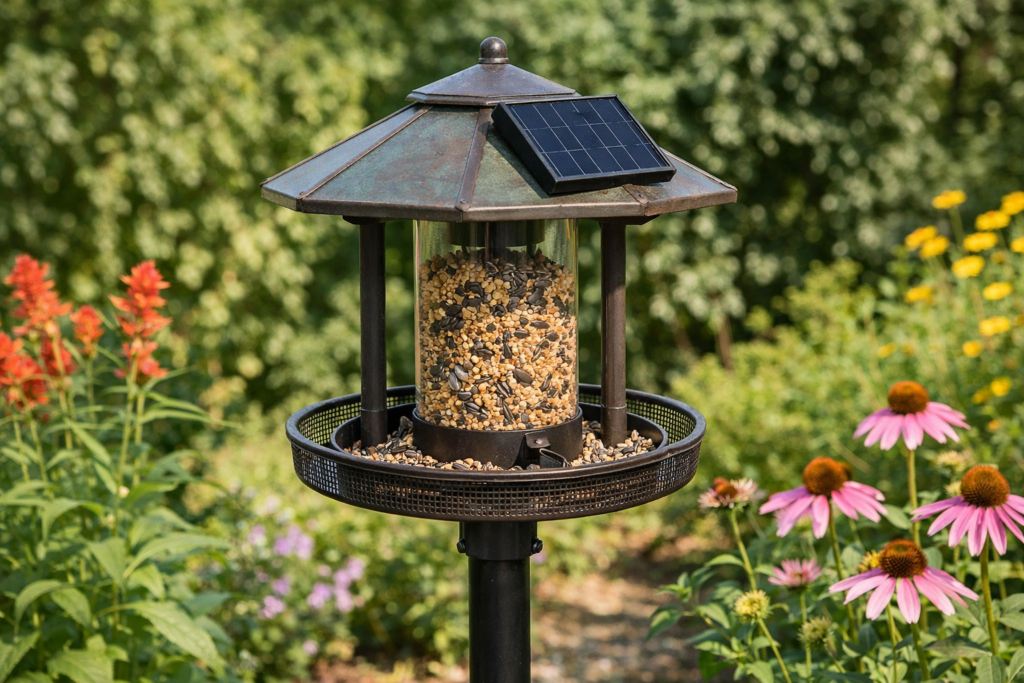
A solar powered smart bird feeder can reduce the need to recharge a battery, particularly when the panel receives consistent direct light. However, shade, seasonal changes and cloudy weather can affect charging. Look for a model with a rechargeable battery and a clear way to monitor its power level.
A feeder that uses a removable battery may be more practical than one that must be taken down for charging. Consider the location of the charging port, cable protection and whether the solar panel can be angled toward available light.
Choosing the Right Installation and Power Setup
Pole, window and hanging placement
The ideal position offers birds a safe feeding area and gives the camera a clear view. A pole-mounted feeder can be placed away from walls and branches, while a hanging feeder may work well from a sturdy bracket or tree limb. Window-mounted designs are convenient for close viewing but may have a narrower field of view.
Avoid placing a feeder where cats can hide nearby. Keep it away from busy paths and use a stable mount that will not swing excessively in wind. A strong Wi-Fi signal is helpful, but safety and camera visibility should come first.
Privacy, Subscriptions and Long-Term Costs
A camera feeder records outdoor activity, so consider what appears beyond your property. Aim the camera toward the feeding station rather than neighboring windows or shared areas. Review the manufacturer’s data, account and storage policies before connecting the device.
The purchase price is only one part of ownership. Include optional cloud subscriptions, replacement batteries, mounting hardware and suitable seed in your comparison. A smart bird feeder without a subscription may be preferable if it supports local storage and still provides the functions you actually need.
How to Maintain a Smart Bird Feeder
Cleaning and bird safety
Regular cleaning helps reduce spoiled seed and contamination. Empty old food, remove debris and follow the manufacturer’s instructions for washing the tray and feeding ports. Allow parts to dry fully before refilling them.
Inspect the feeder after storms for cracks, loose fittings or standing water. Clean the camera lens gently with an appropriate soft cloth. Do not block ventilation openings or use harsh chemicals near feeding surfaces. If many birds appear ill, stop feeding temporarily and seek guidance from a reputable local wildlife or birding authority.
Is a Smart Bird Feeder Worth It?
A smart feeder can be worthwhile for someone who enjoys recording backyard visitors, learning bird species or sharing observations with household members. It is less suitable for anyone who wants a completely maintenance-free feeder or has unreliable Wi-Fi and limited interest in apps.
Start with the features that solve your actual problem. If close-up observation is the priority, camera placement matters most. If charging is inconvenient, investigate solar support and removable batteries. If recurring costs are a concern, compare storage and identification features carefully.
The right smart bird feeder is not necessarily the one with the longest feature list. It is the model that combines a clear view, dependable mounting, manageable maintenance and transparent costs for your particular garden.
Frequently Asked Questions
Do smart bird feeders need Wi-Fi?
Many camera-equipped models need Wi-Fi to send alerts, upload clips or provide live viewing. Some may record locally without an active connection, but capabilities vary by product.
Is a solar powered smart bird feeder completely maintenance-free?
No. Solar charging can reduce manual recharging, but panels still need to remain reasonably clear and battery performance can change with shade and weather. The feeder also requires regular cleaning.
Can a smart feeder identify every bird correctly?
No. Automated identification can make errors because of lighting, motion, camera angle and similar species. Use results as helpful prompts and verify uncertain sightings with a trusted field guide.
What is the best place for a camera bird feeder?
Choose a stable location with a clear camera view, adequate Wi-Fi and protection from immediate hazards. Keep nearby cover available for birds, but avoid dense hiding spots where predators could approach unseen.
Can I use a smart bird feeder without a subscription?
Some models support local storage or offer core functions without a paid plan. Check the exact storage limits and determine whether alerts, identification or historical video require a subscription.
How often should a smart bird feeder be cleaned?
Cleaning frequency depends on weather, seed use and bird activity. Inspect it often, remove wet or spoiled food promptly and follow the manufacturer’s care instructions.
Does a smart bird feeder attract more birds?
The technology itself does not guarantee more visitors. Clean food, suitable seed, safe placement, water and nearby natural cover are usually more important than camera features.